Change Background to White (#FFFFFF) Online Free
Replace any wall or outdoor background with verified pure RGB(255, 255, 255) white in a single click.
Drop your photo here or tap Upload Image
Supports JPG, PNG, WebP up to 15 MB · Default Preset: #FFFFFF
Your photo stays on your device.
Select Background Colour Swatch (In-Page State — No URL Reload):
Or Pick a Curated Studio / Festival Backdrop:
Need to change background to white without studio lighting or paid software? Pure `#FFFFFF` white is the single most requested photo background in India — mandatory for Passport Seva, PAN card portals, SSC/UPSC exam forms, and Amazon/Flipkart main product images.
Every colour swatch on /change-background-to-white runs directly inside your browser so you can export clean, watermark-free photos for make photo background pure white, white background photo editor, convert background to white online.
- Primary Target / Spec
- Pure Digital White — #FFFFFF / RGB(255, 255, 255)
- Default Background & Format
- #FFFFFF · JPG / PNG-24 / WebP (Max 15 MB)
- Data Processing & Watermark
- Client-Side Browser Memory · Free Full-HD Export (No Watermark)
Official Specification Verification Notice ([VERIFY: source needed])
- Amazon.in and Passport Seva pure white RGB(255,255,255) requirement [VERIFY: source needed] — [VERIFY: source needed — Check passportindia.gov.in & sellercentral.amazon.in]Source: Passport Seva & Amazon Seller Central India (https://portal2.passportindia.gov.in)
हिंदी में संक्षेप: फोटो का बैकग्राउंड शुद्ध सफेद (#FFFFFF) करें
Status: DRAFT · Native Hindi Review Pendingयह K01 हिंदी अनुभाग (फोटो का बैकग्राउंड शुद्ध सफेद (#FFFFFF) करें) भारतीय उपयोगकर्ताओं के लिए विशेष रूप से देवनागरी में तैयार किया गया है। फोन या कंप्यूटर पर "change background to white" करते समय यह टूल आपकी फोटो को सीधे ब्राउज़र में सुरक्षित रखता है। पासपोर्ट साइज फोटो के लिए सफेद बैकग्राउंड, पैन कार्ड सिग्नेचर या ई-कॉमर्स लिस्टिंग के लिए फोटो अपलोड करें और तुरंत बिना वाटरमार्क डाउनलोड करें।
आपकी फोटो आपके अपने डिवाइस पर ही सुरक्षित रहती है (Your photo stays on your device).
How to Use Change Background to White (#FFFFFF) Online Free (Step-by-Step)
01. Upload Your Photo for change background to white
Tap the blue "Upload Image" button to select a JPG, PNG, or WebP photo from your phone or PC.
02. Verify the Automatic Cutout
Our on-device canvas engine isolates the subject and preserves hair and shoulder edges.
03. Select Hex Swatch (#FFFFFF)
Pick the calibrated solid colour or gradient swatch and download your high-resolution image.
हिंदी में स्टेप-बाय-स्टेप प्रक्रिया (K01)
Status: DRAFT (Devanagari Steps)चरण 1: फोटो अपलोड करें
नीले "Upload Image" बटन पर टैप करके अपनी गैलरी से फोटो चुनें।
चरण 2: बैकग्राउंड रंग चुनें
स्वैच बार से #FFFFFF या सफेद बैकग्राउंड विकल्प चुनें।
चरण 3: फोटो डाउनलोड करें
किनारे जांचें और "Download" बटन दबाकर साफ फोटो सेव करें।
Use Cases & Practical Tips for change background to white in India
Selecting the exact calibrated shade for change background to white eliminates uneven wall shadows and warm indoor tube-light colour casts across Indian homes and offices.
Pure White (#FFFFFF) vs Off-White Portal Rejection Guide
Why camera photos of white walls look grey (`#D4D4D8`) to computers and how `#FFFFFF` replacement fixes it.
| Shade Name | Hex / RGB Value | Portal Acceptance Status | Best Use Case |
|---|---|---|---|
| Pure Digital White | #FFFFFF / RGB(255, 255, 255) | Accepted by Amazon.in, Passport Seva & PAN portals [VERIFY: source needed] | Official documents & main marketplace listings |
| Soft Studio Off-White | #F8FAFC / RGB(248, 250, 252) | May fail strict Amazon RGB=255 automated check | LinkedIn headshots, resumes & secondary catalog shots |
| Unedited White Wall Photo | #D1D5DB / RGB(209, 213, 219) | Frequently rejected due to shadows & yellow cast | Always run through white background changer first |
Before and After Example
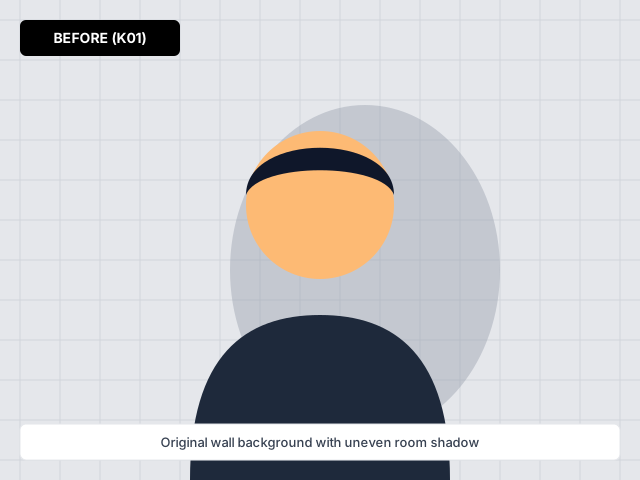
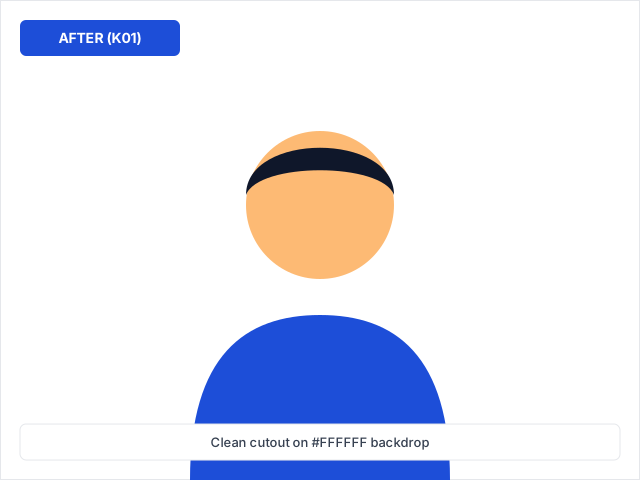
Before and after comparison for change background to white — processed on-device with zero watermark.
Frequently Asked Questions (English)
How does change background to white keep my photo private?
Our segmentation engine runs inside your browser tab on /change-background-to-white, keeping your portrait or product photo in local device memory.
Should I download JPG or PNG after change background to white?
Choose JPG for official forms and e-commerce main images with solid colour backgrounds, or PNG-24 when you need transparency.
Does change background to white work on Android phones?
Yes, the tool loads on demand after you tap Upload and switches colour swatches without reloading the page.
Where are the hex codes for /change-background-to-white listed?
All calibrated RGB and Hex values are documented in our White Shade Comparison for Indian Documents & E-Commerce table on this page.
अक्सर पूछे जाने वाले सवाल (हिंदी FAQ — K01)
Status: DRAFT (3 Fresh Hindi FAQs)प्रश्न 1: क्या "change background to white" में मेरी फोटो सुरक्षित रहती है?
हाँ, आपकी फोटो सीधे आपके ब्राउज़र में प्रोसेस होती है और किसी बाहरी सर्वर पर सेव नहीं होती।
प्रश्न 2: सरकारी फॉर्म के लिए कौन सा फॉर्मेट चुनें?
पासपोर्ट और परीक्षा फॉर्म के लिए सफेद बैकग्राउंड के साथ JPG फॉर्मेट डाउनलोड करें।
प्रश्न 3: घर की दीवार पर परछाई से कैसे बचें?
खिड़की की प्राकृतिक रोशनी की तरफ चेहरा रखें और दीवार से तीन फीट आगे खड़े हों।
Related Background Tools & Guides
Upload any portrait, ID photo, or product shot and switch the background to white, blue, red, or a studio scene in one tap.
Switch any portrait background to official sky blue (#38BDF8) or studio royal blue (#1E40AF) in seconds.
Isolate portraits, watches, and gold jewellery against a true matte black studio canvas in seconds.
Turn a home wall photo into a clean, shadow-free white background portrait for Indian passport and government forms.
Eliminate yellowish tube-light tints and wall shadows to get a true RGB(255, 255, 255) white background.